

Construction work changes quickly. Crews, equipment, weather, deliveries, work zones, and subcontractor schedules can all shift during a single day. That is why effective construction site safety depends on clear communication, reliable planning, and a process for identifying changing hazards before they cause harm.
Digital tools can strengthen that process by solving a real jobsite problem. They should help trained safety professionals and crews see conditions sooner, document concerns faster, and follow through on corrections. Technology is not a substitute for competent supervision, hands-on training, or worker judgment. It is a practical support for all three.
Why Jobsite Safety Needs Practical Technology
Construction sites are dynamic by nature. Materials may block a safe access route in the morning after lunch. Rain can affect footing, noise can make verbal warnings harder to hear, and a new phase of work can introduce equipment or exposures that were not present the week before. Digital tools can give teams another way to recognize those changes and communicate them quickly.
The goal is not to create more paperwork or overwhelm crews with notifications. The goal is to make information useful at the point of work. A mobile inspection form, for example, can capture the location of a hazard, attach a photo, assign an owner, and show whether the correction was completed. That creates a clearer path from observation to action.
Start With the Risk, Not the Device
Before purchasing a platform, sensor, or wearable, safety leaders should define the specific risk they want to reduce. Review incident records, near misses, inspections, and worker feedback. Then rank concerns by the seriousness of the possible outcome, how often the exposure occurs, and how many people may be affected.
- Identify a recurring hazard, such as heat exposure, proximity to equipment, or incomplete inspections.
- Set a clear goal, such as shortening response time to reported hazards.
- Ask affected workers what would fit their tasks and site conditions.
- Test one solution with a small crew, work area, or phase of the project.
- Review the results before expanding the program.
Five Digital Tools That Can Support Safer Work
- Wearables and Personal Alert Devices
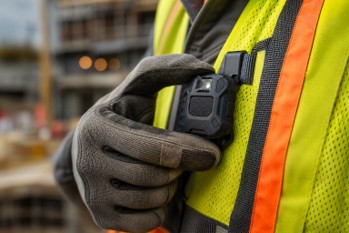
Wearables can support location awareness, emergency communication, fall detection, or exposure alerts during isolated and high-risk work. A device is only helpful if workers can wear it comfortably, use it without distraction, and trust how its data will be handled. Employers should explain what information is collected, who can access it, how long it is kept, and when location tracking is active.
- Sensors for Environmental Conditions
Environmental sensors can help teams monitor conditions such as heat, air quality, gases, noise, vibration, or dust. On a large outdoor project, a supervisor might use heat-condition alerts to prompt additional water breaks, shaded recovery periods, or a review of work pacing. Sensors require correct placement, routine checks, and a defined response plan. An alert without a person responsible for acting on it does little to reduce risk.
- Drones and Remote Site Inspections
Drones can help teams inspect roofs, towers, stockpiles, excavation edges, and other hard-to-reach areas without routinely placing a worker in an elevated or unstable location. However, footage still needs competent human review. Flight planning must account for weather, site activity, people on the ground, and airspace requirements. Commercial operators must follow federal rules for small unmanned aircraft systems, including applicable operating limitations and registration requirements.
- Digital Near-Miss and Inspection Reporting
Quick reporting can reveal patterns before an injury occurs. Mobile forms make it easier to include photographs, locations, descriptions, and assigned follow-up actions while the details are fresh. A useful digital report should answer:
- What happened or nearly happened?
- Where and when did it occur?
- What conditions contributed to the concern?
- What immediate action was taken?
- Who owns the remaining corrective action, and by when?
- Simulation and Immersive Training
Virtual and augmented training can give workers a controlled way to practice equipment decisions, confined-space procedures, emergency response, and fall-prevention choices. These tools are most valuable when short scenarios match the worker’s actual role. They should reinforce, not replace, field demonstrations, supervised practice, and verification that a worker can perform the task safely.
How Artificial Intelligence Can Help Safety Teams
Artificial intelligence can assist with organizing large volumes of inspection records, near-miss reports, and site images. It may help flag recurring hazards, identify location-based trends, or prioritize areas for review. But automated systems can make errors, miss context, or produce alerts that do not reflect actual conditions. A qualified person should review AI-generated findings before they lead to discipline, a work stoppage, or another major decision.
Use Data Without Losing the Human Element
Strong safety programs look beyond injury counts alone. OSHA describes leading indicators as proactive measures that can show whether prevention activities are working before an incident occurs. Construction teams can track completed inspections, corrected hazards, near-miss patterns, urgent-alert response times, training completion, and worker feedback about whether a tool helps or complicates the job.
Data should start a conversation, not end one. If reports show repeated issues around a loading area, supervisors should walk the area with the people who work there, ask what is changing, and remove barriers to safer work. The workers closest to the task often have the most useful context.
Common Problems During Technology Rollouts
Too Many Alerts
Constant notifications can create alert fatigue. Set thresholds that focus attention on conditions requiring action, and review settings when crews begin ignoring messages.
Poor Connectivity
Underground work, remote projects, and changing site layouts can limit connectivity. Choose tools with offline capability where possible and maintain a backup reporting process.
Low Worker Adoption and Weak Follow-Up
Workers are more likely to use a system when they help test it, receive short practical training, and see reported concerns corrected. If alerts disappear into a dashboard without timely action, trust in the program will decline.
A Simple Implementation Plan
- Choose one defined safety challenge.
- Set a measurable improvement goal.
- Involve workers before selecting the tool.
- Run a limited pilot with clear responsibilities.
- Train through demonstrations and task-specific practice.
- Review results after 30, 60, and 90 days.
- Adjust workflows, alert settings, and privacy rules as needed.
- Expand only when the tool is reliable and useful in the field.
Conclusion
Construction safety technology should make safe work easier to understand, report, and support. The best tools address a real hazard, fit the pace of the jobsite, respect workers, and lead to visible follow-through. In 2026, successful teams will not need every new device. They will need practical systems, capable people, and a safety culture that acts on what workers see every day.